Tab Widgets for Teams · Early access
One new tab for your whole team.
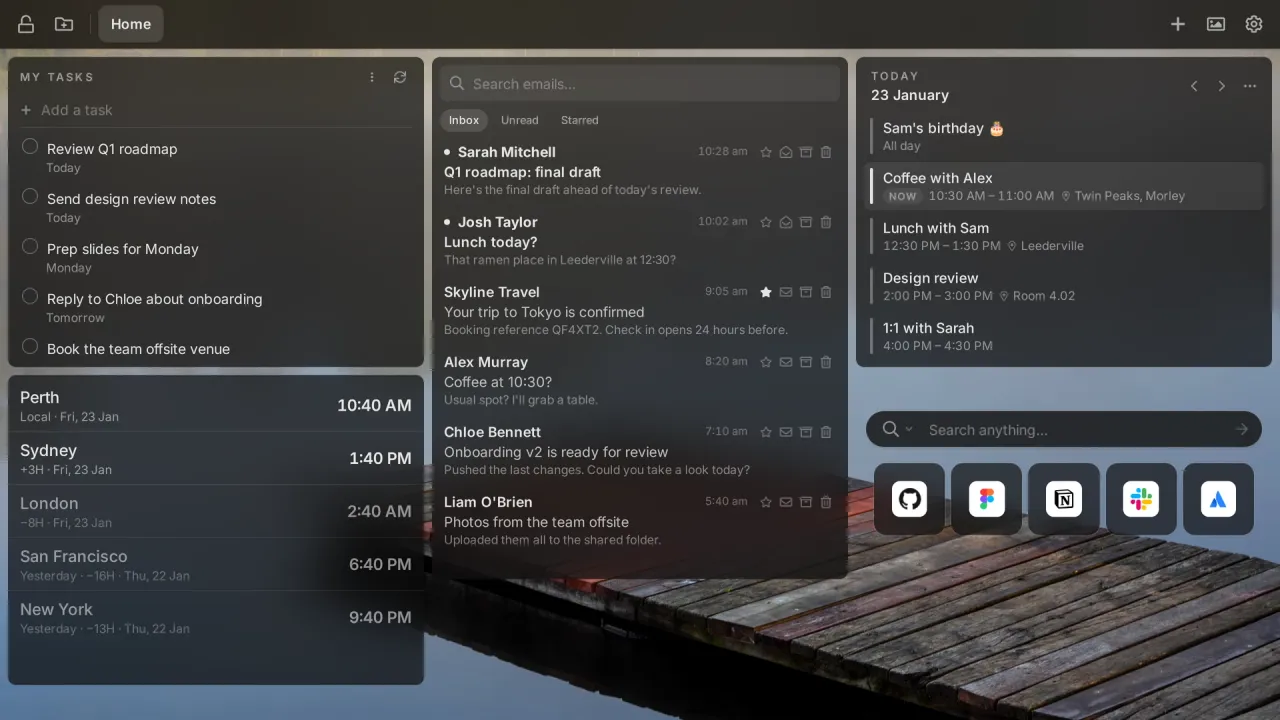
Share the links, widgets and announcements your team needs on every new tab, and manage it all in one place. Now in early access with a small group of teams.
Early access · Chrome and Edge · No commitment
Used by people at these organizations and many more
 Hitachi
 The Washington Post
 Milwaukee Public Schools
 MD Anderson Cancer Center
 Sunrise School Division
Features
Built for the way teams work.
Everything people love about Tab Widgets, plus the tools to share it across your organization.
Shared team pages
Put the tools, docs and dashboards your team uses every day on one page, and it appears on everyone's new tab. Change it once and everyone has the update.
Announcements where people look
Pin news, deadlines and reminders to the tab people open all day, instead of another email that gets archived unread.
Roll out from your admin console
Install it for everyone with Google Admin, Microsoft Intune or Chrome Enterprise policies. Nobody has to set anything up.
Single sign-on
People sign in with the Google Workspace or Microsoft account they already use for work.
Your brand, your rules
Set your company wallpaper and logo, choose which widgets are allowed, and lock the pages that shouldn't change.
Private by design
Gmail, Calendar and Drive content still goes straight from Google to each browser. We never see your team's emails, events or files, and there are no ads.
How it works
Set up once. Everyone's in sync.
- 1
Build your team's pages
Arrange links, widgets and announcements in the same drag-and-drop editor people already use for their own new tab.
- 2
Roll it out
Push it to managed Chrome and Edge browsers from your admin console, or send your team an invite link.
- 3
Everyone's on the same page
Every new tab opens on your team's page, with their own pages and widgets alongside it. Your updates reach everyone straight away.
Who it's for
Made for teams like yours.
Schools and universities
Timetables, the learning platform and today's notices in front of every student and teacher.
IT and operations
Give new starters every link they need on day one, and field fewer “where do I find…” questions.
Remote and hybrid teams
Team time zones, the stand-up link and the shared calendar, a new tab away for everyone.
Sales and support
Targets, dashboards and the help centre on every tab, so the numbers stay front of mind.
Reviews
Don’t just take our word for it.
What people say about Tab Widgets on the Chrome Web Store.
“This is what I've been looking for, for years!
Instead of opening up a whole bunch of tabs to see what I need to see everyday, I can have it all on a dashboard, as well as notes, chatgpt, music and the list goes on. It's so easy to use and customise I absolutely love it.”
“A good, customizable replacement for the Edge/MSN new start tab.”
Jason GrzywnaChrome Web Store review “Beautiful and modern design with a simple and intuitive user interface. … the ability to turn on/off individual selectors as well as write your own custom CSS is extremely powerful (and a bit addictive).”
KirkChrome Web Store review “Works flawlessly to control my hue lights straight from my computer. Excited to see what other features get added.”
Mark DorkhomChrome Web Store review “Great addon for the way I use chrome with a lot of neat features, and most importantly excellent support (initially emailed the developer and later on received a lot of assistance through their discord)”
Dennis JohanssonChrome Web Store review
Early access
Bring Tab Widgets to your team.
We're bringing on a few teams at a time so we can help each one get set up. Tell us about yours and we'll be in touch.
- First to new featuresTry new admin tools before anyone else.
- Priority onboardingBe first in line as we open Teams to more teams.
- Hands-on setupWe help you build your first pages and roll them out.
- A say in what we buildTalk directly to the people building it.
Rather email? Write to us.
Questions about Teams
What is Tab Widgets for Teams?
When can my team start?
How much will it cost?
Which browsers does it work with?
Can people still customize their own new tab?
What happens to our data?
Get your team on the list
Early access spots are limited. Register now and help shape Tab Widgets for Teams.
Register your interest