The 6 Best New Tab Extensions for Chrome in 2026
We compared 9 new tab extensions for Chrome on features, price and updates. The 6 best for 2026, from widget dashboards with Gmail to minimal free pages.

Updated First published
When you open a new tab in Chrome, you get the same search box and a few shortcuts. A new tab extension replaces that page with something more useful: a dashboard, a to-do list, a news feed, or just a calmer place to start.
We compared nine popular new tab extensions and picked the six that are worth installing in 2026, with what each one is best at and where it falls short.
Our top pick: Tab Widgets. Build your own new tab from 80+ widgets, like notes, weather, timers, news and pixel pets, free and with no account. Upgrade to Pro and your Google Calendar, Gmail, Tasks and Drive sit on the same page.
How we picked
We judged each extension on five things:
- What it does on the new tab: widgets, shortcuts, feeds and integrations.
- Customization: layouts, wallpapers, themes and how far you can change them.
- Price and the free tier: what you get without paying.
- Browser support: Chrome, Edge, Firefox and Safari.
- Whether it's maintained and well rated: when it was last updated, and its store rating.
User counts, ratings and update dates are from each extension's Chrome Web Store listing in October 2026.
Disclosure: we make Tab Widgets. We've put it first because it's the most complete widget dashboard here, and we've been upfront about where the others are a better fit.
Quick comparison
| Extension | Best for | Price | Free plan | Browsers | Last updated |
|---|---|---|---|---|---|
| Tab Widgets | Widget dashboard | Free, or Pro at US$4.99/month or US$44.99/year | 10 widgets, 2 pages, no account | Chrome, Edge, web | Oct 2026 |
| Momentum | Focus and calm | Free, or Plus at US$39.95/year | Core features; extras need Plus | Chrome, Edge, Firefox, Safari | Oct 2026 |
| Bonjourr | Minimal and free | Free (donations) | Everything | Chrome, Edge, Firefox, Safari | Jul 2026 |
| daily.dev | Developers | Free, or Plus | Full feed; extras need Plus | Chrome, Edge, web | Oct 2026 |
| start.me | Bookmark pages | Free, or PRO at $25/year | 3 pages, with ads | Chrome, web | Jan 2024 |
| Speed Dial 2 | Visual bookmarks | Free, or Pro | Unlimited dials; sync needs Pro | Chrome, Edge, Firefox | Oct 2026 |
1. Tab Widgets
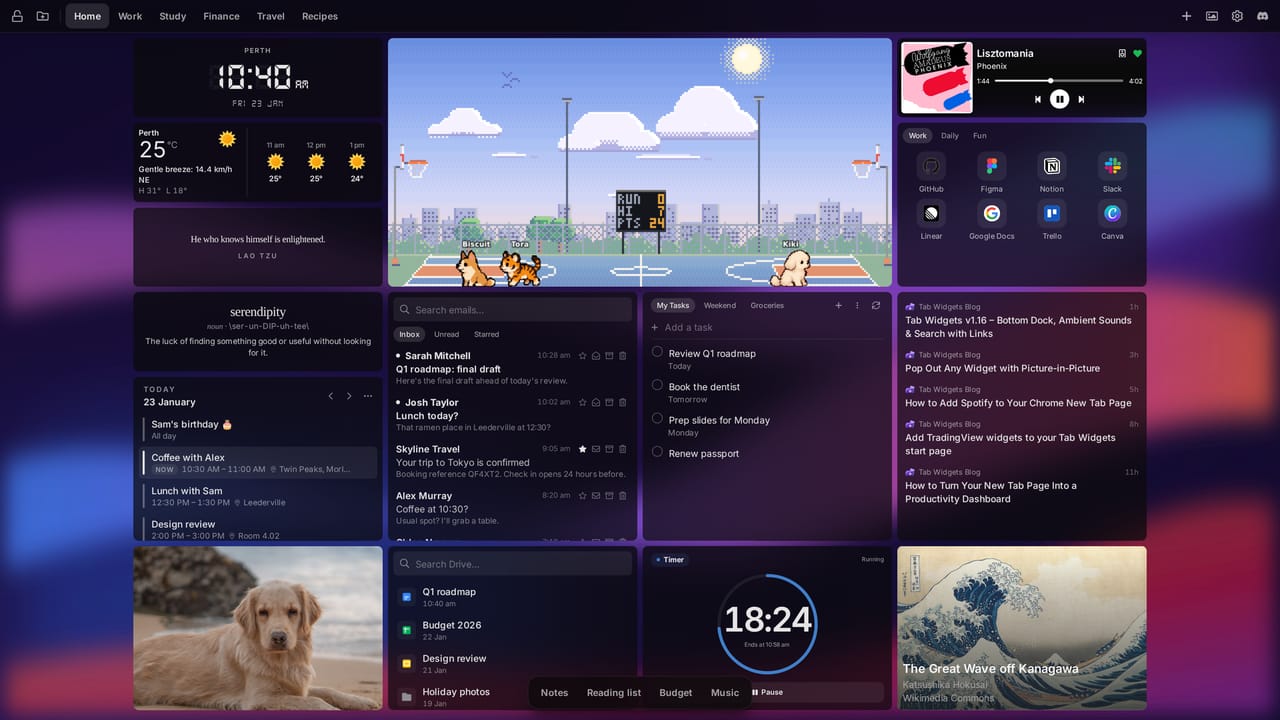
Best for: turning your new tab into a dashboard of everything you check every day.
Tab Widgets turns every new tab into a dashboard you build yourself, from 80+ widgets: sticky notes, reminders, weather, clocks, a Pomodoro timer, ambient sounds, news, a calculator, countdowns, Philips Hue controls, and an embed widget for other websites. Keep one calm, minimal page, or build a page for each part of your day (work, study, travel) and keep extra widgets tucked away in a dock until you need them.
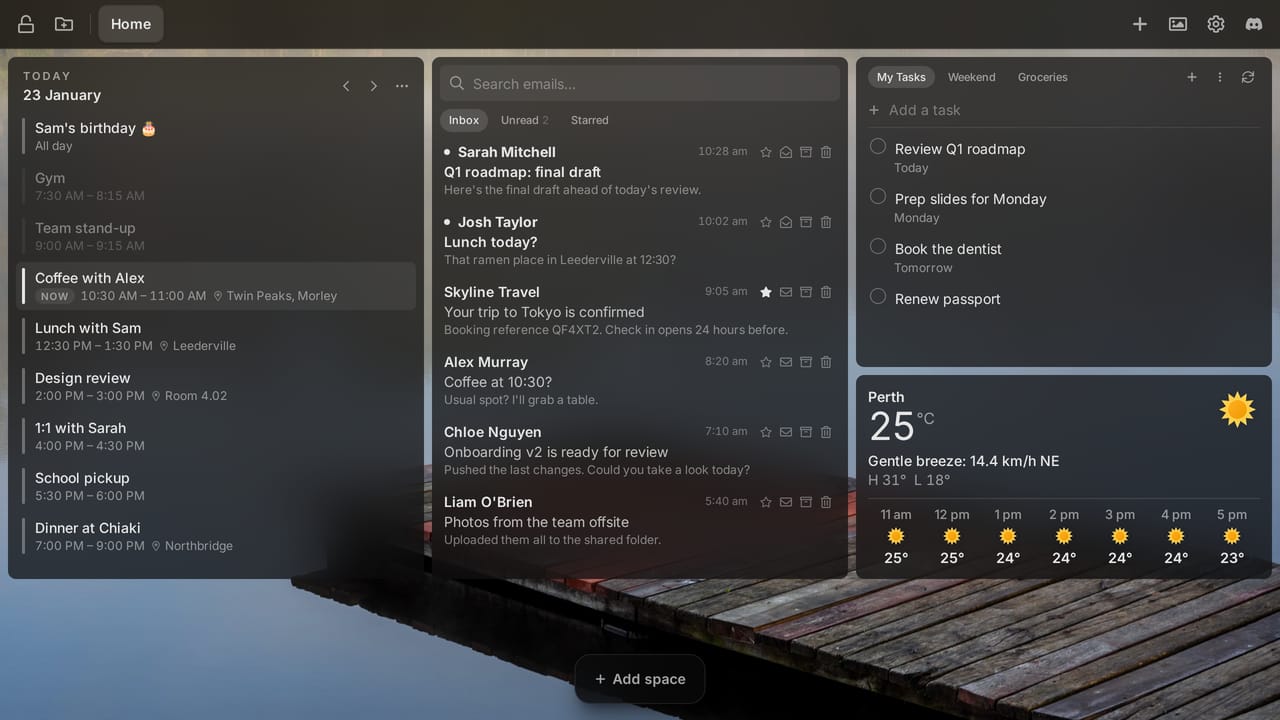
Your day at a glance. With Pro, Google Calendar, Gmail, Google Tasks and Google Drive sit right on your new tab, so you can check your agenda, clear your inbox and tick off tasks without opening another tab. Your browser fetches them straight from Google, and the content never passes through our servers.
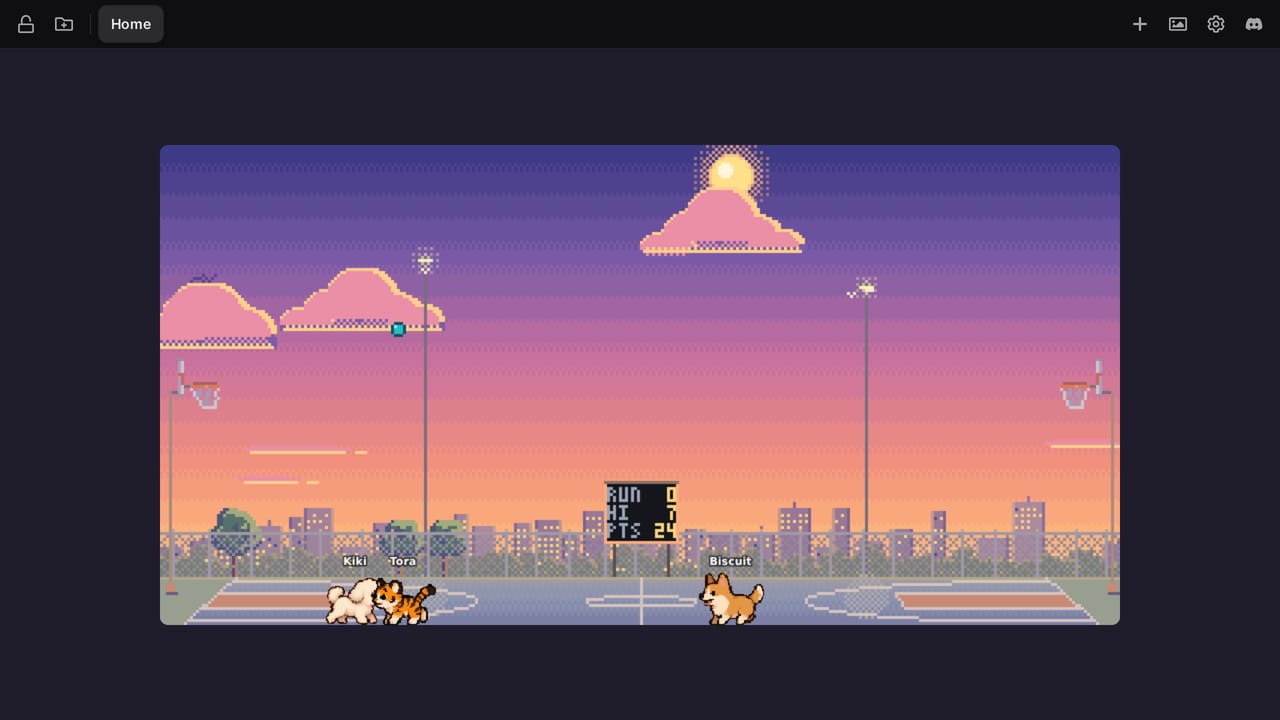
A little fun, too. Version 2.0 added pixel pets that live on your new tab. Throw a ball, drop a treat or shoot some hoops between tabs.
Pop any widget out. Picture-in-picture floats any widget, like a timer, a note or your to-do list, in its own window that stays on top while you work in other apps. Add video and GIF wallpapers, light and dark mode and your own layouts, and no two setups look the same.
Pros
- 80+ widgets, from notes and timers to Gmail, Google Calendar and Philips Hue.
- Pages, a dock and picture-in-picture keep your tools a click away.
- Pixel pets, video wallpapers and themes make opening a new tab genuinely fun.
- Free to start with no account, and your Google data goes straight from Google to your browser.
- Featured on the Chrome Web Store, a badge Google gives extensions that follow its recommended practices.
Cons
- Chrome and Edge only (plus a web version), with no Firefox or Safari extension.
- Newer than Momentum or Speed Dial 2, so it has far fewer store reviews so far.
- The Google widgets, RSS, Spotify and cloud sync are part of Pro.
Price: free for up to 10 widgets on 2 pages, with no account, and pets are free too (1 per widget). Pro is US$4.99 a month or US$44.99 a year (prices vary by region), with a 30-day money-back guarantee. It unlocks unlimited widgets and pages, the Google widgets, RSS, Spotify, TradingView, cloud sync and more layout options. See pricing.
2. Momentum

Best for: a calm new tab that asks for your one focus for the day.
Momentum is one of the best-known new tab extensions, with 2 million users on Chrome alone. Each new tab shows a daily photo, the time, a greeting, an inspirational quote and the one thing you said you'd focus on today. There's a simple to-do list too.
Pros
- Polished and calming, with a beautiful photo every day.
- Available on Chrome, Edge, Firefox and Safari, with an iOS app.
Cons
- Many extras, like unlimited Focus Mode, a vision board and Tab Stash, need Plus.
- It's built around focus, not a dashboard, so there's little room for your own widgets.
Price: free, or Momentum Plus at US$39.95 a year.
3. Bonjourr

Best for: a minimal, good-looking new tab that's completely free.
Bonjourr greets you with the time, the weather and your quick links over 4K photo and video backgrounds that change through the day. It also has notes, a Pomodoro timer, quotes, custom fonts and custom CSS. It's open source, needs no account, collects no data, and has no paid tier. With a 4.9 rating from over 24,000 ratings, it's one of the best-reviewed new tab extensions on the Chrome Web Store.
Pros
- Free and open source, funded by donations.
- Clean and fast, and works on Chrome, Edge, Firefox and Safari.
Cons
- Deliberately minimal: no calendar, email or dashboard-style widgets.
Price: free.
4. daily.dev
Best for: developers who want tech news on every new tab.
daily.dev swaps the new tab for a personalized feed of developer articles from over 2,000 sources. You choose topics such as React or Kubernetes, and can upvote, comment and join groups called Squads. It's rated 4.9 from almost 3,000 ratings.
Pros
- The best option on this list if you're a developer.
- Free and open source, with an optional Plus tier.
Cons
- It's a news feed with a row of shortcuts, not a dashboard: no clock, weather or notes.
- Not much use if you don't work in tech.
Price: free, or daily.dev Plus.
5. start.me
Best for: organising lots of bookmarks into start pages you can share.
start.me turns your new tab into a page of bookmark lists, RSS feeds, notes, to-dos and widgets, saved to your start.me account so it follows you between browsers and devices. Pages can be shared, which makes it popular with teams.
Pros
- Good for large collections of links, with bookmark import.
- Pages work on any device, and can be shared with a team.
Cons
- The Chrome extension itself hasn't been updated since January 2024.
- The free plan shows ads and is limited to three pages, and widgets like Calendar and Stock Quotes need PRO.
- It's built around an account, so it's less private than local-first options.
Price: free with ads, or start.me PRO at $25 a year.
6. Speed Dial 2 New Tab

Best for: visual bookmarks organised into groups.
Speed Dial 2 is a long-running new tab extension. It shows your favorite sites as a grid of thumbnails that you sort into groups like Work or Fun, with themes, custom backgrounds and a Focus Mode that blocks distracting sites on a schedule.
Pros
- Unlimited bookmarks and groups for free.
- Available on Chrome, Edge and Firefox, with mobile apps.
Cons
- Its Chrome Web Store rating is low (2.2 from 7,700 ratings), so read recent reviews before installing.
- Sync and backups need a Pro account.
Price: free, or Speed Dial 2 Pro.
Not recommended in 2026
You'll still find these three in other lists, but we no longer recommend them for a new install.
Infinity New Tab (Pro) is a popular grid of website shortcuts with wallpapers and a sidebar of extras, rated 4.7 from over 24,000 ratings. But in December 2025, security researchers linked its publisher to ShadyPanda, a campaign that turned browser extensions into spyware through updates. The report doesn't say Infinity itself did anything malicious, and its developers deny any wrongdoing (in Chinese). But a new tab extension sees every tab you open, so we'd pick one from a publisher without that history.
NightTab and Tabliss are well-loved, free and open source, but neither has been updated in a long time.

NightTab is a sleek grid of bookmark tiles with lots of control over themes, fonts and colors. Its Chrome extension was last updated in June 2024.

Tabliss offers beautiful backgrounds and simple widgets like a clock, quotes and search. Its Chrome extension was last updated in April 2022.
If you liked NightTab or Tabliss, Bonjourr is the closest maintained alternative. If you wanted Infinity's grid of shortcuts, try Speed Dial 2.
Which new tab extension should you choose?
- You want your calendar, email, notes and tools on every new tab: Tab Widgets.
- You want a calm page that keeps you focused: Momentum.
- You mostly jump between the same sites: Speed Dial 2.
- You want something free, minimal and open source: Bonjourr.
- You're a developer and want curated tech news on every new tab: daily.dev.
- You manage a lot of bookmarks, or share pages with a team: start.me.
Other options worth a look: Anori, a free, open-source widget dashboard, and Protopage, a long-running start page with a strong RSS reader.
Tip: start with one extension and use it for a week. If you're reaching for it without thinking, it's earning its place.
How to install a new tab extension (and switch back)
In Chrome
- Open the extension's page on the Chrome Web Store and click Add to Chrome.
- Open a new tab. Chrome asks whether to keep the change: choose Keep it.
- To go back to Chrome's default new tab, go to
chrome://extensionsand turn off or remove the extension.
In Microsoft Edge
- Install the extension from the Microsoft Edge Add-ons store, or from the Chrome Web Store after allowing extensions from other stores.
- Open a new tab and keep the change when Edge asks.
- To switch back, go to
edge://extensionsand turn off or remove the extension.
For more on making your new tab your own, see our guide to customizing your browser's new tab page.
Frequently asked questions
What is the best new tab extension for Chrome?
It depends on what you want from a new tab. Tab Widgets is the best fit for a customizable dashboard of widgets like Google Calendar, Gmail, notes and weather. Momentum suits a calm, focus-first page, Bonjourr a minimal free one, Speed Dial 2 a grid of bookmarks, and daily.dev developers who want a news feed.
What is the best free new tab extension?
Bonjourr and daily.dev are free with no paid tier needed for the core features, and Bonjourr is open source. Tab Widgets has a free plan with up to 10 widgets on 2 pages, and no account needed.
How do I change my new tab page in Chrome?
Chrome doesn't let you set a custom new tab page in its settings, so you need a new tab extension. Install one from the Chrome Web Store, open a new tab, and choose Keep it when Chrome asks whether to keep the change.
How do I get Chrome's default new tab page back?
Go to chrome://extensions and turn off or remove the new tab extension. The next tab you open shows Chrome's default new tab page again.
Are new tab extensions safe?
Most are, but an extension can read whatever its permissions allow, and an update can change what it does. In 2025, researchers found popular browser extensions, including new tab pages, that had been turned into spyware through updates. Before installing, check the permissions it asks for, who publishes it, its privacy policy, its recent reviews and when it was last updated.
Do new tab extensions slow down Chrome?
A new tab extension loads every time you open a tab, so a heavy one can make new tabs feel slower. One that only replaces the new tab page doesn't run on the sites you visit. Fewer widgets and lighter wallpapers keep a new tab page quick.